

Product Overview
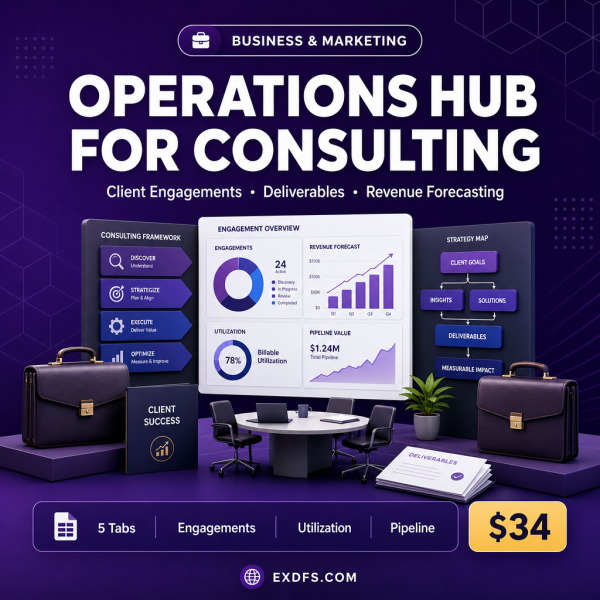
Consulting work is billed by engagement, tracked by deliverable and staffed by utilization, three things most generic project templates were never built to connect. Operations Hub for Consulting takes the proven Business Operations Hub framework and rebuilds it around consulting work: client engagements, deliverables, proposals, revenue forecasting and consultant scheduling.
It stays a single Excel workbook, so there is nothing new to install and no additional seat licences. Enter your own engagements and consultants and the formulas, charts and status colors do the rest.
Key Features
- Client Engagement Manager — scope, status and key contacts for every active engagement.
- Deliverable & Milestone Tracker — due dates and completion status for each deliverable.
- Proposal & Pipeline Dashboard — track proposals in flight alongside won and lost values.
- Revenue & Utilization Forecasting — project future revenue based on booked engagements and consultant hours.
- Knowledge Base & Methodology Library — a central place to store reusable frameworks and past deliverables.
- Consultant Allocation & Scheduling tab — see who is staffed on what and who has capacity.
- Auto-calculating formulas — revenue, utilization rate, KPI achievement and budget usage update as you type.
- Conditional formatting and dropdowns — color-coded engagement and deliverable status flags with pre-built entry menus.
What’s Included
6 files, delivered as one ZIP (XLSX, TXT, MD).
- Product/Operations_Hub_for_Consulting.xlsx — the consulting-specific operations workbook.
- Bonus/Business_Metrics_Cheat_Sheet.txt — KPI reference with definitions and benchmarks.
- Bonus/SOP_Template.md — a reusable Standard Operating Procedure template.
- Documentation/Quick_Start_Guide.txt — setup instructions.
- Documentation/README.txt — file overview and tab-by-tab notes.
- License/License.txt — usage terms.
Who This Is For
- Independent consultants who want engagements, deliverables and revenue in one file.
- Small consulting firms that need a shared operations view without expensive practice-management software.
- Practice managers tracking consultant utilization and staffing across engagements.
- Business development leads managing a proposal pipeline alongside active client work.
- New consulting founders who want a professional-looking system from their first engagement.
Why Choose This Product
- Consulting terminology built in — engagements, deliverables and utilization instead of generic business fields you would have to relabel yourself.
- Revenue forecasting included — see projected revenue from booked engagements and consultant hours, not just past numbers.
- No new software — works in Excel, Google Sheets and LibreOffice Calc.
- Fully editable — add consultants, engagements or methodology entries and adjust formulas as your practice grows.
How To Use
- Open Documentation/Quick_Start_Guide.txt for setup steps.
- Open Product/Operations_Hub_for_Consulting.xlsx in Excel, Google Sheets or LibreOffice Calc.
- Replace the sample engagements and proposals with your own clients and deals.
- Enter consultant hours and rates, then confirm the utilization and revenue forecasts update.
- Use Bonus/SOP_Template.md to document your engagement kickoff or delivery process.
Frequently Asked Questions
What format are the files? One ZIP with 6 files: the consulting workbook in XLSX, two bonus references in TXT and MD, a Quick Start Guide and README in TXT, and the licence in TXT.
Can I edit the files? Yes, every tab, field and formula is unlocked so you can relabel columns, add engagements or adjust the calculations for your practice.
What software do I need? Microsoft Excel 2016 or later for full feature support, or Google Sheets and LibreOffice Calc 6 or later for most features.
Is this for personal or commercial use? Yes. The licence covers personal and commercial use within your organization, including running your real client engagements on it. Resale, public redistribution and use inside a competing digital product are not permitted.
What is the refund policy? As a digital download the workbook is non-refundable once downloaded. If your file is missing or corrupted, contact us and we will send a replacement.
Can I track more than one consultant’s utilization? Yes, the Consultant Allocation & Scheduling tab is built as a table you can extend with additional consultant rows.
Does it forecast revenue automatically? Yes, based on booked engagement values and entered consultant hours, the Revenue & Utilization Forecasting tab projects revenue forward.
Does it include sample data? Yes, each tab ships with sample engagements and proposals so you can see the formulas working before entering your own.
Bonus Materials
Two extras are included at no additional cost: the Business Metrics Cheat Sheet, covering more than 25 KPI definitions with formulas and benchmarks, and the SOP Template, a ready structure for documenting your engagement kickoff, delivery or handoff process.






Reviews
There are no reviews yet.