



Product Overview
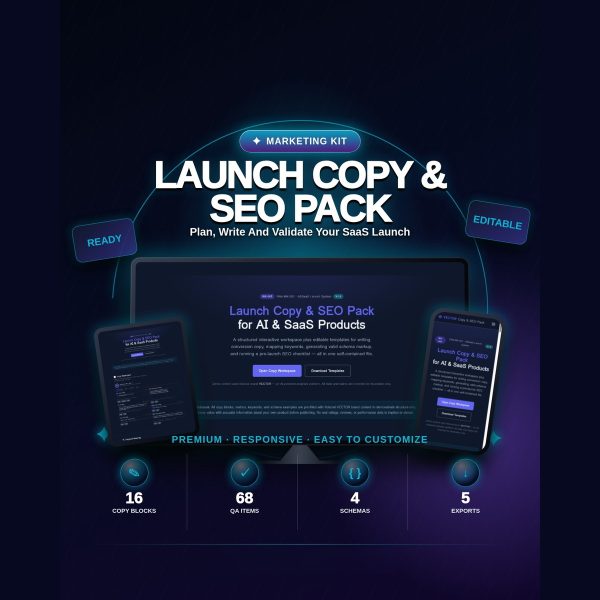
Launching an AI or SaaS product means writing a headline, a meta description, schema markup, ad copy, social posts and an email sequence, then checking all of it against SEO and compliance rules before it goes live. Doing that across a dozen scattered documents is where launches slip. VECTOR — Launch Copy & SEO Pack puts the whole workflow into one self-contained HTML workspace, so you write, check character limits and preview your SERP snippet in the same screen.
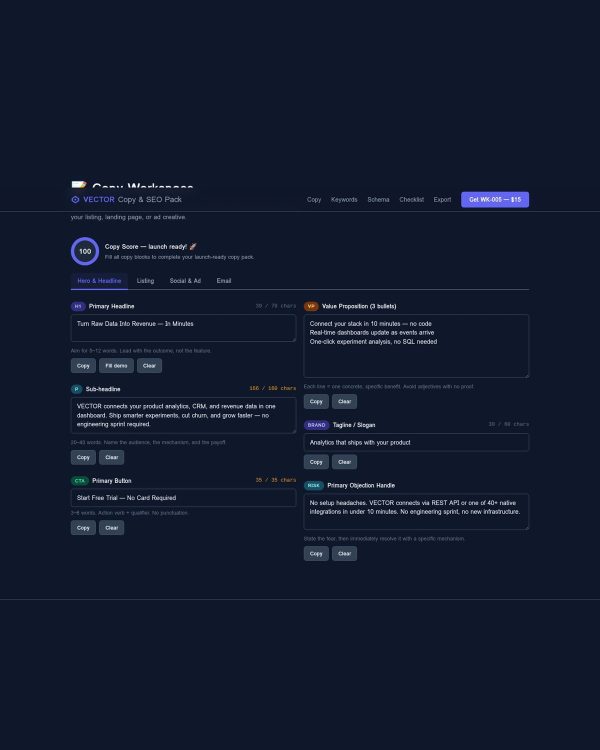
The workspace opens directly in any browser with no installation and no internet connection required. It is pre-filled with sample copy for a fictional demo brand called VECTOR so you can see the structure of every field before you replace it with your own product’s copy.
Key Features
- Interactive HTML workspace — a single browser-based file with live character counters for every field, so you never submit an over-length title tag.
- Real-time SERP preview — see how your title and meta description will actually look in search results as you type.
- Schema viewer with copy buttons — four JSON-LD templates (SoftwareApplication, Organization, FAQPage, BreadcrumbList) ready to copy into your site head.
- Interactive 68-item launch checklist — eight sections covering copy foundations, on-page SEO, technical SEO, structured data, Open Graph, launch channels, marketplace listing, and compliance.
- 16 copy block prompts — headline, sub-headline, CTA, value bullets, tagline, objection handling, meta description, listing copy, social posts, ad headlines and descriptions, and email sequence, each with rules and character limits.
- Product Specification document — the full technical breakdown of every field, limit, and design token used in the workspace.
- QA Report — the internal quality check the pack was built against, useful as a reference for your own review process.
- No fabricated ratings or invented metrics — every schema template and copy prompt is structured to hold your real numbers, not placeholder claims.
What’s Included
9 files, delivered as one ZIP.
- Product/Launch_Copy_SEO_Pack/ — index.html, the self-contained interactive workspace containing all copy blocks, the keyword mapping guidance, the schema viewer and the checklist in one browser tool.
- Product_Specification.md — complete field-by-field reference for the workspace.
- QA_Report.txt — the quality assurance notes for this release.
- Bonus/ — Copy_Audit_Worksheet.md (a scoring rubric for reviewing existing copy) and Schema_Validation_Checklist.md (a step-by-step JSON-LD validation walkthrough).
- Documentation/ — Quick_Start_Guide.md, Quick_Start_Guide.pdf, and README.md.
- License/ — License.txt.
Who This Is For
- SaaS and AI founders launching a product and writing their own copy for the first time.
- Marketers and copywriters who want a repeatable structure instead of starting from a blank page for every launch.
- SEO practitioners who need JSON-LD schema and metadata fields covered correctly before submission.
- Agencies and freelancers running launches for multiple clients who want one reusable workspace per project.
- Indie hackers shipping on Product Hunt, Gumroad, or their own site who need copy and SEO handled in one sitting.
Why Choose This Product
- One workspace, not a folder of loose files — the copy blocks, schema, and checklist live inside a single HTML tool, so nothing gets left in the wrong tab.
- Built-in limits, not guesswork — live character counters and a SERP preview stop you from writing a title tag that gets cut off in search results.
- Honest schema templates — the JSON-LD examples are structured correctly with no invented review counts or fake ratings baked in.
- Works offline — no build step, no account, no internet connection needed once the file is downloaded.
- Commercial licence included — use it on your own products and on client launches.
How To Use
- Unzip the download and open Documentation/README.md, then Documentation/Quick_Start_Guide.pdf for a walkthrough of every section.
- Open Product/Launch_Copy_SEO_Pack/index.html in any modern browser and replace the VECTOR demo copy with your own product details, field by field.
- Use the schema viewer to fill in the four JSON-LD templates and copy them into your site’s head tag, then validate with the Bonus Schema Validation Checklist.
- Work through the interactive 68-item checklist before launch day, checking off each section as it is completed.
- Run your finished copy against the Bonus Copy Audit Worksheet to score it before publishing.
Frequently Asked Questions
What format are the files? One ZIP with a self-contained HTML workspace, two Markdown bonus worksheets, a Markdown product specification, a plain text QA report, documentation in Markdown and PDF, and the licence in TXT.
Can I edit the files? Yes. The HTML workspace is a plain text file you can open and edit directly in any browser or text editor, and the Markdown worksheets can be edited in any Markdown or plain text editor.
What software do I need? Any modern web browser to run the workspace, plus a text or Markdown editor if you want to edit the underlying files. No install, plugin, or paid software is required.
Is this for personal or commercial use? Both. The licence covers personal and commercial use, including client launches. Resale or redistribution of the files themselves is not permitted.
What is the refund policy? As a digital download the product is non-refundable once downloaded. If a file is missing or corrupted, contact us for a replacement.
Does the workspace need an internet connection? No. Once downloaded, the HTML file runs entirely offline in your browser.
Are the four JSON-LD schema templates ready to use as-is? They are structurally correct and ready to be filled with your product’s real details; replace the VECTOR demo values before publishing them live.
Is the demo brand VECTOR a real company? No. VECTOR is a fictional AI analytics platform used only to demonstrate how each copy block and schema field should be filled in.
Bonus Materials
Two bonus worksheets are included at no extra cost: the Copy Audit Worksheet, a structured rubric for scoring your finished copy against conversion best practices, and the Schema Validation Checklist, a step-by-step guide for checking your JSON-LD markup before it goes live. Together they turn the launch workspace into a full pre-launch review process, not just a writing tool.






Reviews
There are no reviews yet.