
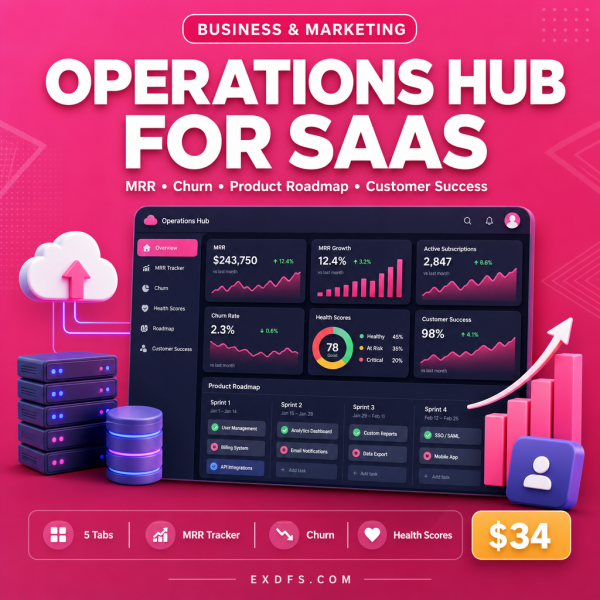

Product Overview
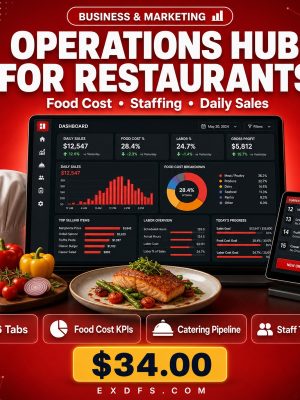
Most SaaS teams end up tracking revenue in one sheet, churn in another, the roadmap in a project tool and support tickets somewhere else entirely. The Operations Hub for SaaS puts all of it in a single Excel workbook built specifically around subscription-business metrics, so you open one file to see how the business is actually doing.
It is a variant of the wider Business Operations Hub framework, rebuilt with SaaS terminology, sample data and pipeline stages already in place. Every number you type flows into pre-built formulas, so revenue, churn rate and KPI achievement update the moment you edit a cell.
Key Features
- MRR & ARR Revenue Tracker — see monthly and annual recurring revenue trend automatically as you log new customers and cancellations.
- Churn & Retention Analytics — track logo churn and revenue churn side by side so you know which one is actually the problem.
- Product Roadmap & Sprint Tracker — plan releases and see sprint status without switching to a separate project tool.
- Customer Success & Health Scores — flag at-risk accounts before they cancel, using a color-coded scoring system.
- Support Ticket & SLA Dashboard — monitor response times and open tickets against your service targets.
- Feature Request & Bug Tracker — keep customer feedback and known issues in one prioritized list.
- Auto-calculating formulas — revenue, margins and KPI achievement update instantly, no manual recalculating.
- Conditional formatting — green, yellow and red status indicators make problems visible at a glance.
- Data validation dropdowns — pre-built menus keep data entry consistent across your whole team.
What’s Included
6 files, delivered as one ZIP (XLSX, TXT, MD).
- Product/ — Operations_Hub_for_SaaS.xlsx, the main workbook with 8 linked tabs.
- Bonus/ — Business_Metrics_Cheat_Sheet.txt (KPI reference guide with benchmarks) and SOP_Template.md (reusable Standard Operating Procedure template).
- Documentation/ — Quick_Start_Guide.txt and README.txt.
- License/ — License.txt.
Who This Is For
- SaaS founders who need one place to see MRR, churn and roadmap status without three separate tools.
- Customer success managers tracking account health and support SLAs across a growing customer base.
- Operations leads who want a professional dashboard without paying for dedicated software.
- Startup teams that want organized, presentable metrics for investor updates.
- Consultants who set up reporting systems for SaaS clients and want a proven starting workbook.
Why Choose This Product
- Built for SaaS specifically — the terminology, sample data and pipeline stages already match a subscription business, so you are not adapting a generic template from scratch.
- No new software or monthly fee — it runs in the spreadsheet app you already have, with no subscription cost on top of your purchase.
- Formulas already wired — revenue, churn and KPI tracking calculate themselves, which most free templates skip.
- Commercial licence included — use it inside your own company or for client engagements.
How To Use
- Unzip the download and open Documentation/Quick_Start_Guide.txt first.
- Open Product/Operations_Hub_for_SaaS.xlsx in Excel, Google Sheets or LibreOffice Calc and replace the sample data with your own customers and metrics.
- Set up the Customer Success and Support tabs with your current accounts and tickets.
- Review the Executive Dashboard tab weekly to track MRR, churn and roadmap progress in one view.
- Use the SOP_Template.md in Bonus/ to document any recurring process you build around the workbook.
Frequently Asked Questions
What format are the files? One ZIP with a XLSX workbook, plus TXT and MD reference files for the bonus content, guide and licence.
Can I edit the files? Yes. Every tab, formula and field in the workbook is fully editable, and you can add rows or new tabs as your business grows.
What software do I need? Microsoft Excel 2016 or later gives full feature support; Google Sheets supports most features; LibreOffice Calc 6+ supports the basics.
Is this for personal or commercial use? Both. The licence covers personal and commercial use within your organization, including sharing with your own team. Resale or redistribution of the files themselves is not permitted.
What is the refund policy? As a digital download this product is non-refundable once downloaded. If a file is missing or corrupted, contact us for a replacement.
Does this replace dedicated SaaS analytics software? No. It is a spreadsheet dashboard for teams that want organized metrics without a paid subscription; for very large customer bases you may eventually outgrow it.
Can I add my own tabs or metrics? Yes, the workbook is unlocked, so you can extend it with additional tabs or formulas specific to your business.
Will it work on Mac? Yes, it works in Excel or Google Sheets on Mac the same as on Windows.
Bonus
Two extras come with the workbook at no additional cost: the Business Metrics Cheat Sheet, which explains over 25 KPI definitions with formulas and industry benchmarks, and the SOP Template, a ready-to-use format for documenting any repeatable process. Together they help you not just track your SaaS metrics but also standardize how your team operates around them.




Reviews
There are no reviews yet.