

Product Overview
Free edition — 50 transaction records and 50 broker 1099-DA lines. No account, no email, no time limit, no watermark. Every calculation, export and the printable memo work in full. If a tax year does not fit in 50 rows, the full edition removes the row limit.
If you cannot show what you paid, the whole sale price can be treated as gain. Your broker files a Form 1099-DA that reports what you sold and for how much — and very often leaves the cost-basis box empty. Basis now has to be tracked per wallet, and a transfer between two accounts you own can arrive on the form looking exactly like a sale.
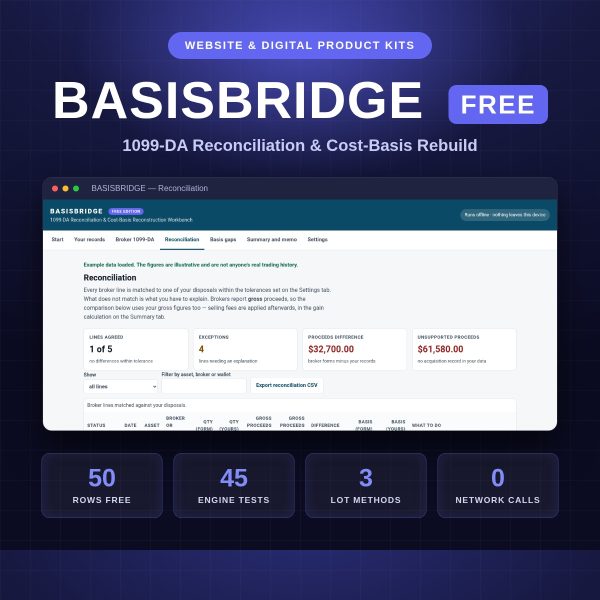
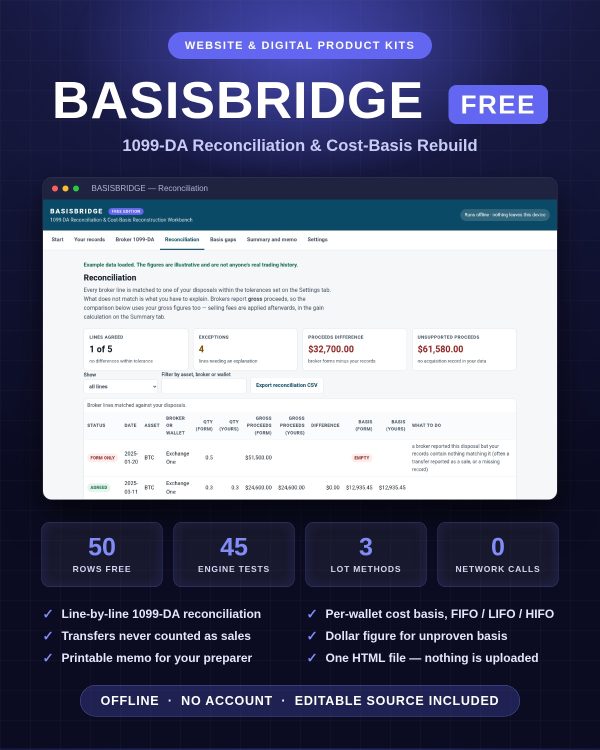
BASISBRIDGE Free is an offline workbench that puts your own records next to every broker line, shows exactly where the two disagree, rebuilds cost basis wallet by wallet, and prints a reconciliation memo your preparer can actually use. You choose the tax year, the lot method and the matching tolerances; the workbench reconciles that year line by line. It is one HTML file. No account, no subscription, no upload — your transaction history never leaves your device.
What you get free, in full
Matching, per-wallet basis reconstruction, FIFO, LIFO and HIFO, the basis-gap report, every CSV export, backup and restore, and the complete printable memo — unmodified. The only difference between this and the paid edition is table size.
Key Features
- Line-by-line reconciliation — every broker line is matched to one of your disposals and classified as agreed, review, form only, or no form, so you know precisely what has to be explained.
- Per-wallet cost basis — lots are drawn from the account the disposal happened in, with FIFO, LIFO or HIFO selection, matching the way basis now has to be tracked.
- Transfers stop looking like sales — move coins between your own wallets and the original basis and acquisition date travel with them, so no phantom gain appears and the holding period keeps running.
- Two exposure figures, in dollars — how much was reported without any basis, and how much you currently cannot substantiate at all, with the worst case if that basis is treated as zero.
- Gap finder — disposals with no acquisition, transfers that never arrived, arrivals with no origin, duplicate transaction ids and unusable rows are listed as specific, actionable errors.
- CSV import that fits real exports — common headings from exchange and wallet exports are mapped automatically; a failed import never touches the rows you already have.
- Working papers, not just numbers — a printable reconciliation memo plus CSV exports of your records, the broker lines, the reconciliation and the disposals.
- Genuinely offline — and you can prove it — the app makes no network request of any kind. Open your browser’s developer tools, watch the Network tab while you work, and you will see nothing recorded. Disconnect the machine and everything still works.
- Editable source included — readable, unminified engine and interface files, a build script and a 40-case test suite you can run yourself.
What’s Included
- Product/index.html — the complete application in one self-contained file
- Product/samples/ — four CSV files: a worked example and blank templates for both imports
- Editable/Source/ — engine.js, app.js, app.template.html, build.js, test.js and a source guide
- Bonus/Cost_Basis_Reconstruction_Playbook.pdf — the evidence ladder and a working method for rebuilding basis you can support
- Bonus/Records_Request_Letter_Templates.txt — four ready-to-send requests for statements, archived histories and corrections
- Bonus/Exchange_Export_Column_Map.csv — 38 common export headings mapped to the columns this workbench expects
- Documentation/ — README, Quick Start Guide (PDF), technical specification, formula register, architecture note, browser compatibility, security and privacy, data privacy sheet, test report, known limitations, changelog
- License/ — licence, code licence addendum, third-party notices
- 35 files. Formats: HTML, JS, CSV, PDF, MD, YAML, JSON, TXT.
Who This Is For
- If you received a 1099-DA with an empty basis box and have to prove what you paid.
- If you self-custody and move coins between exchanges and hardware wallets, so your history lives in several places at once.
- If a transfer was reported as a sale and you need a documented explanation before anyone asks for one.
- If you are a bookkeeper or preparer handling digital-asset clients and want a working paper rather than a black-box total.
- If you refuse to upload your full wallet history to a cloud service to do your taxes.
- If you keep records in a spreadsheet and want the lot logic, per-wallet rules and exception reporting done properly.
Why Choose This Product
- It reconciles, it does not just calculate. Tax calculators tell you a number. This tells you where your number and the broker’s number diverge, line by line, and what to do about each one.
- Nothing leaves your device. No account, no upload, no telemetry, no licence check. Verify it by disconnecting from the network and carrying on.
- One file, every platform. No installer, no operating-system limit, no subscription that locks your own history behind a renewal.
- Auditable arithmetic. Every formula is published in the formula register, and the 40-case test suite ships with the product so you can run it yourself.
- A build you can reproduce. Run the included build script against the included source and it regenerates the very same application file you were sent, byte for byte. Nothing is hidden inside the app you cannot read.
How To Use
- Unzip the download and open Product/index.html in Chrome, Edge, Firefox or Safari.
- Press Load example data to see a finished reconciliation, then clear it.
- Set your tax year, lot method and tolerances on the Settings tab.
- Import or type your records, then key in the lines from each broker form.
- Work through the exceptions and the basis gaps.
- Export the CSV files, print the memo, and download a backup.
Tested on current Chrome, Edge, Firefox and Safari, on Windows, macOS, Linux, tablet and phone. The automated test matrix is run on all three engines behind those browsers — Chromium, Firefox and WebKit — at five screen sizes, and the results ship with the product. Nothing to install and no internet connection required.
FAQ
What format are the files?
One self-contained HTML application, four CSV samples and templates, readable JavaScript source, and documentation in PDF, Markdown, YAML, JSON and text. 35 files in total.
Can I edit the files?
Yes. The full unminified source is included with a build script and a test suite, so you can change formulas, columns, wording and styling and rebuild the single-file app.
What software do I need?
A modern browser. Nothing else. Node.js is needed only if you want to rebuild the app after editing the source.
Which tax year does it cover?
Any year you choose. You set the tax year on the Settings tab and the reconciliation, the memo and the exports all follow that selection.
Is this for personal or commercial use?
Both. A single-user licence covers your own work and client engagements. You may not resell or redistribute the files. See the licence and the code licence addendum.
What is the refund policy?
Digital products are non-returnable once downloaded; see the store refund policy. If anything does not work, contact support through exdfs.com.
Does it connect to my exchange or wallet?
No, deliberately. There are no connections, no keys and no addresses to enter. You import CSV files you export yourself, which is why your history never leaves the machine.
Does it file my taxes or give tax advice?
No. It is a reconciliation working paper. It performs arithmetic on the figures you enter, produces a memo and exports, and applies no tax rates or jurisdiction-specific rules. Review the output with a qualified tax professional.
Which lot methods are supported?
FIFO, LIFO and HIFO, always applied within the account where the disposal happened, with a configurable long-term holding threshold.
Bonus Materials
Three bonuses are included at no extra cost, and each is useful on its own: the Cost-Basis Reconstruction Playbook (the evidence ladder from broker confirmations down to reconstructed records, and the working method that closes a gap properly), the Records Request Letter Templates (four requests that actually get statements, archived histories and corrections out of providers), and the Exchange Export Column Map (38 export headings mapped to the columns the workbench expects, so your first import works).





Reviews
There are no reviews yet.