

Product Overview
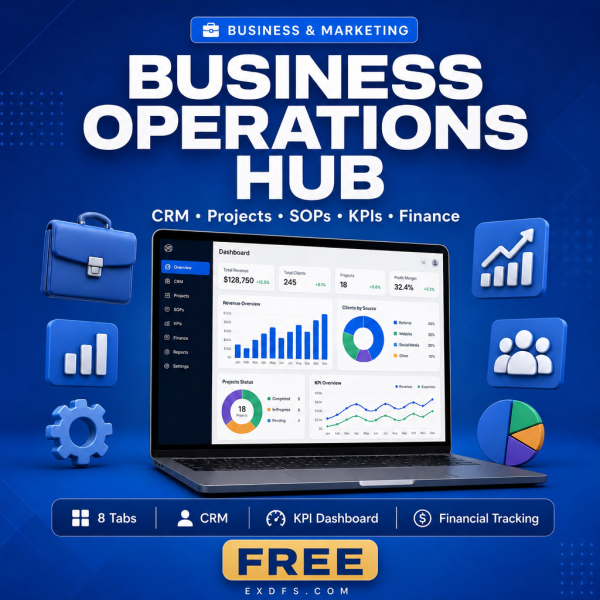
Most small businesses end up running operations across a CRM tool, a project board, a finance spreadsheet and a folder of loose documents that never stay in sync. The Business Operations Hub replaces that sprawl with one Excel workbook that holds your clients, projects, KPIs, finances, team and documents in eight linked tabs, with the formulas already built.
It is designed for owners and managers who want visibility without adopting new software: no logins, no monthly fees, no learning curve beyond a spreadsheet you already know how to open.
Key Features
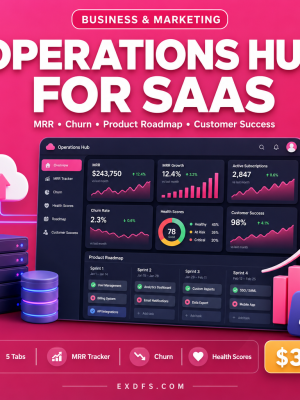
- Executive Dashboard — KPI cards, a revenue chart and a project status pie chart on one screen.
- CRM & Contacts tab — lead pipeline stages, deal values and an automatic win rate calculation.
- Project Tracker — progress bars, budget tracking and priority flags for every active project.
- SOPs Library — a centralized procedure catalog with version control fields.
- KPI Metrics tab — target versus actual comparisons with auto-calculated achievement and status.
- Financial Overview — revenue streams and expenses rolling up into an automatic profit and loss summary.
- Team Management tab — an employee directory with workload indicators.
- Document Library — a repository for key business documents with access-level notes.
- Conditional formatting and dropdowns — color-coded status indicators and pre-built validation menus throughout.
What’s Included
6 files, delivered as one ZIP (XLSX, TXT, MD).
- Product/Business_Operations_Hub.xlsx — the 8-tab operations workbook.
- Bonus/Business_Metrics_Cheat_Sheet.txt — KPI reference with definitions and benchmarks.
- Bonus/SOP_Template.md — a reusable Standard Operating Procedure template.
- Documentation/Quick_Start_Guide.txt — setup instructions.
- Documentation/README.txt — file overview and tab-by-tab notes.
- License/License.txt — usage terms.
Who This Is For
- Small business owners who want one file that shows the whole business at a glance.
- Operations managers juggling multiple projects and teams without dedicated software.
- Startup founders who want professional-looking operations from day one.
- Consultants who need to present organized client or business data quickly.
- Team leads tracking workloads, budgets and deadlines in one place.
Why Choose This Product
- Everything in one workbook — CRM, projects, KPIs, finances, team and documents instead of five separate tools.
- Formulas already built — revenue, margins, KPI achievement and budget usage calculate themselves as you enter data.
- No new software — works in Excel, Google Sheets and LibreOffice Calc, so there is nothing new to learn.
- Fully editable — add rows, rename fields or adjust formulas to match how your business actually runs.
How To Use
- Open Documentation/Quick_Start_Guide.txt for setup steps.
- Open Product/Business_Operations_Hub.xlsx in Excel, Google Sheets or LibreOffice Calc.
- Replace the sample data on the Executive Dashboard, CRM and Project Tracker tabs with your own.
- Set your KPI targets on the KPI Metrics tab and confirm the achievement formulas update.
- Use Bonus/SOP_Template.md to start logging your own procedures in the SOPs Library.
Frequently Asked Questions
What format are the files? One ZIP with 6 files: the operations workbook in XLSX, two bonus references in TXT and MD, a Quick Start Guide and README in TXT, and the licence in TXT.
Can I edit the files? Yes. Every tab, formula and cell in the workbook is unlocked and editable, and the SOP template is meant to be filled in with your own procedures.
What software do I need? Microsoft Excel 2016 or later for full feature support, or Google Sheets and LibreOffice Calc 6 or later for most features.
Is this for personal or commercial use? Yes. The licence covers personal and commercial use within your organization, including customizing it for your own business. Resale, public redistribution and use inside a competing digital product are not permitted.
What is the refund policy? As a digital download the workbook is non-refundable once downloaded. If your file is missing or corrupted, contact us and we will send a replacement.
Will the charts break if I add or remove rows? The charts and formulas are built to extend with your data as long as you insert rows inside the existing tables rather than below them; the Quick Start Guide explains where to add rows safely.
Can I share the file with my team? Yes, internal sharing with your own team or organization is permitted under the licence; public sharing or redistribution is not.
Does it include sample data? Yes, each tab ships with sample entries so you can see the formulas working before you replace them with your own numbers.
Bonus Materials
Two extras are included at no additional cost: the Business Metrics Cheat Sheet, covering more than 25 KPI definitions with formulas and benchmarks, and the SOP Template, a ready structure for documenting any repeatable process in your business. Together they help you populate the KPI Metrics and SOPs Library tabs faster.




Reviews
There are no reviews yet.