

Product Overview
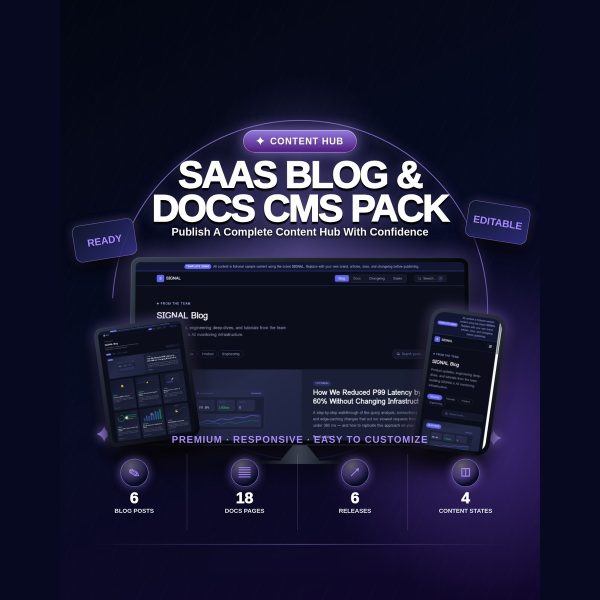
Most SaaS products end up with a blog on one platform, docs on another, and a changelog nobody maintains. SIGNAL puts all three in a single self-contained HTML/CSS/JS file: a filterable blog, a searchable documentation sidebar, and a changelog with release-type filtering, all sharing one visual system.
The file opens in any browser and runs with no internet connection, no CMS platform, and no backend. It also includes nine content-state patterns, such as empty search results and offline errors, that most content hub templates skip entirely.
Key Features
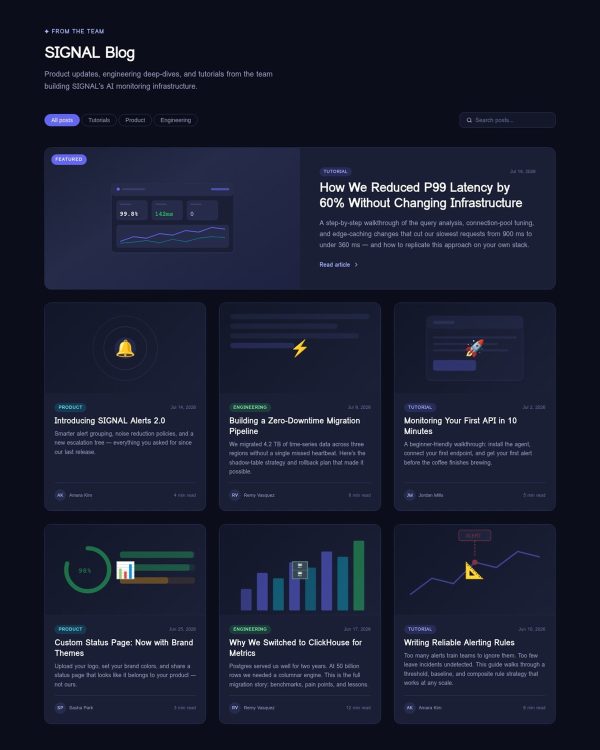
- Blog section — category filter buttons, live client-side search, a two-column featured post layout, six sample post cards with CSS-only images, and a full article view with a reading progress bar.
- Docs section — sticky sidebar navigation with live search that filters links, breadcrumbs, info/warning/success callouts, inline code and code blocks, and prev/next pagination across five sample pages.
- Changelog section — version and date display, four change-type badges (New, Improved, Fixed, Removed), and a release-type filter for All, Major, Minor, and Patches.
- Nine content-state patterns — empty blog, empty search, coming-soon docs, two loading skeletons, 404, 500, offline, and a rate-limit countdown.
- Zero external dependencies — no framework, CDN, npm, remote font, or external library; the file works with no internet connection.
- FAM-WK-001 compatible design tokens — shares the same color variable system as the LUMEN and CLARITY templates, so all three work together as one SaaS site.
- Accessibility-minded build — semantic landmarks, ARIA roles and states, keyboard navigation, visible focus indicators, a skip-to-content link, and reduced-motion support.
- Five tested responsive widths — 360, 390, 768, 1280, and 1440 pixels.
- CMS Integration Cheatsheet — fetch patterns and code snippets for connecting Contentful, Sanity, Ghost, Strapi, or the Notion API.
What’s Included
10 files, delivered as one ZIP (HTML, MD, PDF, TXT).
- Product/SaaS_Blog_Docs_CMS_Pack/ — index.html (the complete content hub, inline CSS and JavaScript) and demo-content.md (a disclosure and replacement guide for the sample content)
- Bonus/ — Content_Planning_Worksheet.md, CMS_Integration_Cheatsheet.md
- Documentation/ — Quick_Start_Guide.md, Quick_Start_Guide.pdf, README.md
- License/ — License.txt
- Root files — Product_Specification.md, QA_Report.txt
Who This Is For
- SaaS founders — who need a blog, docs, and changelog live without a CMS subscription.
- Product teams — publishing release notes and documentation that need to stay in sync visually.
- Developer relations teams — who want a working docs search and changelog before committing to a full CMS integration.
- Agencies and freelancers — delivering a content hub for client SaaS products under the commercial license.
- Teams using LUMEN and CLARITY — who want a matching content section using the same design tokens.
Why Choose SIGNAL
- Three products in one file — blog, docs, and changelog share one visual language instead of three disconnected tools.
- Content states are covered — empty, loading, error, and offline patterns are built in, not left for you to design later.
- CMS-ready groundwork — the included cheatsheet gives you fetch patterns for the most common headless CMS providers.
- Consistent with the rest of the family — shared design tokens mean it fits directly alongside LUMEN and CLARITY.
How To Use
- Unzip the download and open Documentation/Quick_Start_Guide.pdf for the setup walkthrough.
- Review demo-content.md to see every sample blog post, doc page, and changelog entry that needs replacing.
- Open Product/SaaS_Blog_Docs_CMS_Pack/index.html in a code editor and replace the sample content with your own posts, docs, and releases.
- Use the Content_Planning_Worksheet.md to plan your editorial calendar and docs structure before publishing.
- If you want dynamic content, follow the CMS_Integration_Cheatsheet.md to connect a headless CMS, then deploy index.html to any static host.
Frequently Asked Questions
What format are the files? One ZIP containing a single self-contained HTML file with inline CSS and JavaScript, plus Markdown and PDF guides, a specification file, a QA report, and a license file.
Can I edit the files? Yes. index.html is fully editable, including all blog posts, documentation pages, and changelog entries.
What software do I need? A code editor and a web browser. Connecting a real CMS requires writing a JavaScript fetch layer, but that is optional.
Is this for personal or commercial use? Both. The license covers personal projects, your own business, and client work. Reselling, redistributing, or sharing the source files as a standalone template or competing product is not permitted.
What is the refund policy? As a digital download, SIGNAL is non-refundable once downloaded. If a file is missing or corrupted, contact support and it will be replaced.
Does SIGNAL come with a real CMS or backend? No. It is a static front-end template with sample content; connecting it to a live CMS like Contentful or Sanity requires your own fetch() data layer, for which the cheatsheet gives starting patterns.
Are the blog and docs sample posts real content? No, they use a fictional sample brand and are meant to be replaced with your own content before publishing.
Does the search work without a backend? Yes. Both the blog search and the docs sidebar search run entirely in the browser using client-side JavaScript, with no server required.
Bonus Materials
Two extras are included beyond the content hub itself: the Content Planning Worksheet, covering an editorial calendar, a docs structure planner, and a pre-launch checklist, and the CMS Integration Cheatsheet, with fetch patterns and code snippets for Contentful, Sanity, Ghost, Strapi, and the Notion API to help you move from static demo content to a live data source.



Reviews
There are no reviews yet.