

Product Overview
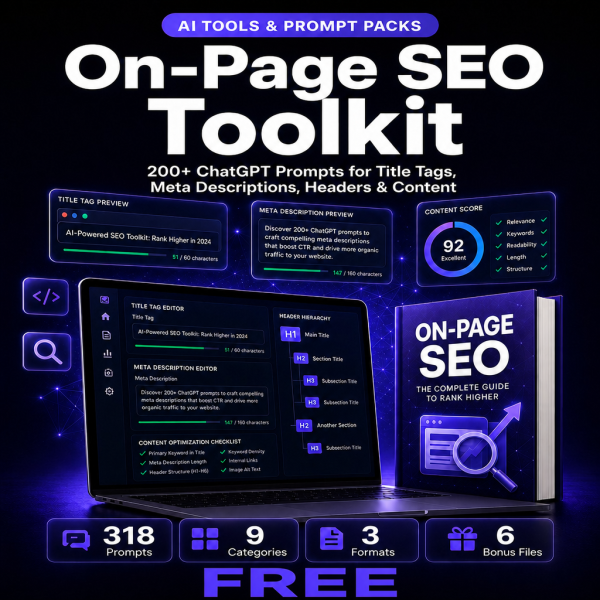
Writing a good title tag or meta description from scratch, one page at a time, is one of the slowest parts of on-page SEO work. The On-Page SEO Toolkit replaces that blank-page problem with 318 prompts organized into nine on-page categories, from title tags and meta descriptions through header strategy, content structure, internal linking, image optimization, schema markup, URL architecture, and audit reporting.
Every prompt is written to be pasted directly into ChatGPT, Claude, Gemini, or any AI assistant, then customized with your own page details in seconds. The toolkit is delivered as a 98-page PDF guide for browsing by category, a categorized spreadsheet for filtering by task, and a plain-text file for the fastest possible copy-paste workflow.
Key Features
- 318 on-page SEO prompts — covering title tags, meta descriptions, headers, content structure, internal linking, images, schema, URLs, and audits.
- Title Tag Optimization prompts (48) — generate and test title variations against character limits and click intent.
- Meta Description Mastery prompts (44) — write descriptions built to earn the click, not just fill the field.
- Header Tag Strategy prompts (36) — structure H1 through H4 tags around search intent and readability.
- Content Structure & Optimization prompts (46) — restructure existing pages for both readers and search engines.
- Schema Markup & Rich Snippets prompts (32) — draft structured data your developer can implement directly.
- On-Page SEO Audit & Reporting prompts (24) — generate client-ready audit summaries in minutes.
- Works with any AI assistant — ChatGPT, Claude, Gemini, and Copilot all handle the prompts as written.
- Three file formats — PDF for browsing, XLSX for filtering, TXT for copy-paste speed.
What’s Included
8 customer-facing files across 5 folders (PDF, XLSX, TXT, README, license).
- Product/ — On_Page_Seo_Toolkit.pdf, the 98-page main guide with all 318 prompts organized by category.
- Editable/ — On-Page_SEO_Prompts_Categorized.xlsx (searchable, filterable spreadsheet) and On-Page_SEO_Prompts_Complete.txt (plain text for quick copy-paste).
- Bonus/ — On-Page_SEO_Quick_Reference_Card.pdf, On-Page_SEO_Checklist.pdf, On-Page_SEO_Implementation_Tracker.xlsx.
- Documentation/ — README.txt.
- License/ — License.txt.
Who This Is For
- In-house SEO professionals — who need to produce optimized title tags and meta descriptions across hundreds of pages faster.
- Digital marketing agencies — running the same on-page audits and rewrites across multiple client accounts.
- Content creators and copywriters — who write pages but are not SEO specialists and need a structured starting point.
- Freelance SEO consultants — who bill for on-page work and want to deliver it faster without cutting quality.
- Business owners managing their own website — without a dedicated SEO hire, but with pages that need real optimization.
Why Choose This Product
- 318 prompts, not a handful of generic examples — every on-page task from title tags to schema markup is covered with dedicated prompts.
- Organized by task, not dumped in one list — nine categories mean you can go straight to the section you need.
- Three formats for three workflows — browse the PDF, filter the spreadsheet, or copy straight from the text file.
- Commercial license included — use the prompts for your own site, your employer’s site, or your clients’ sites.
How To Use
- Open Product/On_Page_Seo_Toolkit.pdf to browse all 318 prompts by category.
- Copy the prompt that matches your current task and paste it into ChatGPT, Claude, or Gemini.
- Replace the bracketed placeholders with your page details: URL, target keyword, current title, or content topic.
- Use On-Page_SEO_Prompts_Categorized.xlsx to filter by category when working through a full site audit.
- Track completed pages with the On-Page_SEO_Implementation_Tracker.xlsx so nothing gets optimized twice.
Frequently Asked Questions
What format are the files? A ZIP containing one PDF guide, one XLSX spreadsheet, one TXT file of all prompts, two bonus PDFs, one bonus XLSX tracker, a README, and the license.
Can I edit the files? Yes. The XLSX spreadsheet and TXT file are fully editable, so you can adapt any prompt’s wording or add your own. The PDF guide is reference material.
What software do I need? A PDF reader, a spreadsheet app such as Excel or Google Sheets, and access to any AI assistant like ChatGPT, Claude, or Gemini.
Is this for personal or commercial use? Both. The license covers personal use and commercial use, including client work for agencies and freelancers. Reselling or redistributing the prompt files themselves is not permitted.
What is the refund policy? As a digital download the product is non-refundable once downloaded. If a file is missing or corrupted, contact us and we will send a replacement.
Do I need a paid ChatGPT subscription to use these prompts? No, the prompts work with free-tier AI assistants; a paid plan simply gives you faster or longer responses.
Are the prompts specific to one CMS or platform? No, the prompts focus on the on-page elements themselves, so they apply whether your site runs on WordPress, Shopify, or a custom build.
How is this different from generic SEO prompt lists online? Every prompt here targets one specific on-page task with a defined output, rather than a broad “improve my SEO” request that produces vague answers.
Bonus Materials
Three extras come with the main toolkit at no additional cost: the On-Page SEO Quick Reference Card for the prompts you will reach for most often, the On-Page SEO Checklist for a manual pass over any page before it goes live, and the On-Page SEO Implementation Tracker spreadsheet for logging which pages have already been optimized. Together they turn a one-time prompt pack into a repeatable on-page workflow.







Reviews
There are no reviews yet.