
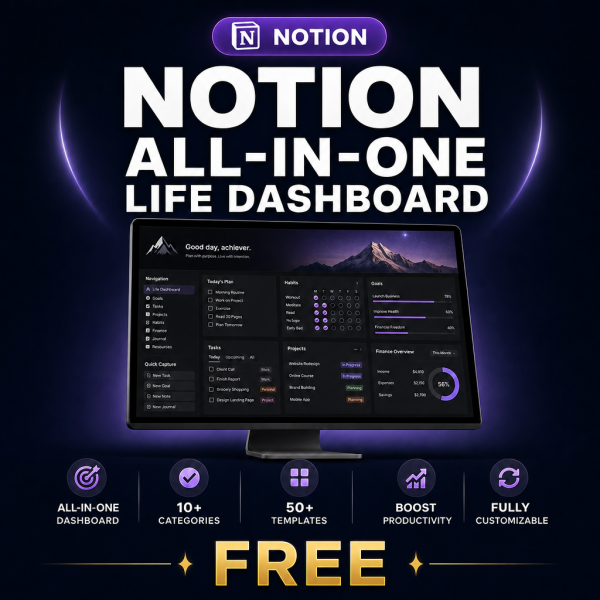

Product Overview
Most Notion dashboards fail for the same reason: the pages look beautiful, but the databases are not related, the formulas break, and nothing updates itself. The Notion All-in-One Dashboard kit fixes that by giving you the build plan instead of a fragile copy-paste template.
Inside you get four core guides — setup, database relations, formulas and automations — plus three editable XLSX planners you fill in before you touch Notion, so your workspace is designed once and built correctly. It is made for anyone who wants one place for goals, habits, finances, projects and health, and who wants to understand the system well enough to extend it later.
Key Features
- Step-by-step Dashboard Setup Guide — build the full workspace in order, so you never end up half-finished.
- Database Relations Guide — connect goals, tasks, projects and habits properly, so one update flows everywhere.
- Formula & Function Reference — copy-ready formulas with plain-English explanations, so progress bars and rollups actually work.
- Automation & Integration Handbook — set up recurring tasks and integrations so the dashboard maintains itself.
- Three editable XLSX planners — plan your pages, database schema and shortcuts before building, which prevents costly rework.
- Aesthetic Design Guide (bonus) — make the workspace clean and calm instead of cluttered.
- Weekly Review Template (bonus) — a 15-minute routine that keeps the system alive after week one.
- Quick Start Guide — know exactly which file to open first.
- Personal and commercial licence — use it for your own workspace or for client work.
What’s Included
12 files, delivered as one ZIP (PDF, XLSX, MD, TXT).
- Product/ — Dashboard_Setup_Guide.pdf, Database_Relations_Guide.pdf, Formula_Function_Reference.pdf, Automation_Integration_Handbook.pdf
- Editable/ — Dashboard_Planning_Worksheet.xlsx, Database_Schema_Planner.xlsx, Notion_Shortcuts_Reference.xlsx
- Bonus/ — Notion_Aesthetic_Design_Guide.pdf, Weekly_Review_Template.pdf
- Documentation/ — Quick_Start_Guide.pdf, README.md
- License/ — License.txt
Who This Is For
- New Notion users — if you have opened Notion, felt lost, and closed it again.
- Productivity rebuilders — if your current setup is five disconnected pages you no longer open.
- Freelancers and solo founders — if goals, client projects and finances live in three different tools.
- Students and researchers — if you need one place for deadlines, reading and habits.
- Consultants building for clients — if you want a repeatable, documented build you can charge for.
Why Choose This Product
- You learn the system, not just receive it — free templates break the moment you change them; the guides here explain why each relation and formula exists.
- Design before you build — the XLSX planners are the part free downloads never include, and they are what stops you rebuilding your workspace three times.
- Automation is covered — most Notion products stop at layout; this one continues into recurring tasks and integrations.
- Commercial licence included — you may use the material in paid client work, which most free templates forbid.
How To Use
- Unzip the download and open Documentation/Quick_Start_Guide.pdf.
- Fill in Dashboard_Planning_Worksheet.xlsx and Database_Schema_Planner.xlsx in Excel, Google Sheets, LibreOffice or Numbers.
- Follow Dashboard_Setup_Guide.pdf in Notion (free plan is enough), then wire up relations and formulas with the two reference guides.
- Add automations with the Automation_Integration_Handbook.pdf.
- Run the Weekly_Review_Template.pdf routine every week to keep the dashboard current.
Frequently Asked Questions
What format are the files? One ZIP containing 12 files: eight print-ready PDF guides, three editable XLSX worksheets, plus a README (MD) and the licence (TXT).
Can I edit the files? Yes. The XLSX planners are fully editable and unlocked. The PDF guides are reference material and are not designed to be edited.
What software do I need? A PDF reader, a spreadsheet app (Excel, Google Sheets, LibreOffice Calc or Numbers) and a free Notion account. No paid plan or plugin is required.
Is this for personal or commercial use? Both. The licence permits personal and commercial use, including client work. Resale, redistribution and repackaging of the files are not permitted.
What is the refund policy? As a digital download the product is non-refundable once it has been downloaded. If a file is missing or corrupted, contact us and we will replace it.
Is a ready-made Notion template file included? No — this is a build kit: guides, formulas, automations and planning worksheets. You build the dashboard in your own workspace, which is why you can adapt it freely afterwards.
How long does the full build take? Most people complete the core dashboard in one to two focused hours, then extend it over the following week.
Do I get updates? Yes. When the guides are revised, the updated ZIP is available from your account download link.
Bonus Materials
Two extras are included at no additional cost: the Notion Aesthetic Design Guide, so your workspace looks deliberate rather than cluttered, and the Weekly Review Template, a 15-minute routine that keeps the dashboard useful long after setup day. Together they are the difference between a dashboard you admire once and a system you actually run your week from.


Mary Doughtie (verified owner) –
**⭐⭐⭐⭐⭐ 5/5**
I was pleasantly surprised by how well this toolkit is organized. Instead of offering just a few templates, it provides a complete learning package with setup guides, database relations, formulas, automation tips, and practical planning worksheets. The folder structure is clean, and the documentation makes it easy to navigate. Whether you’re new to Notion or looking to build a more efficient workspace, this resource offers solid value and saves a lot of trial and error. A well-designed and practical toolkit overall.